St. Jude CareCircle App

Project Overview
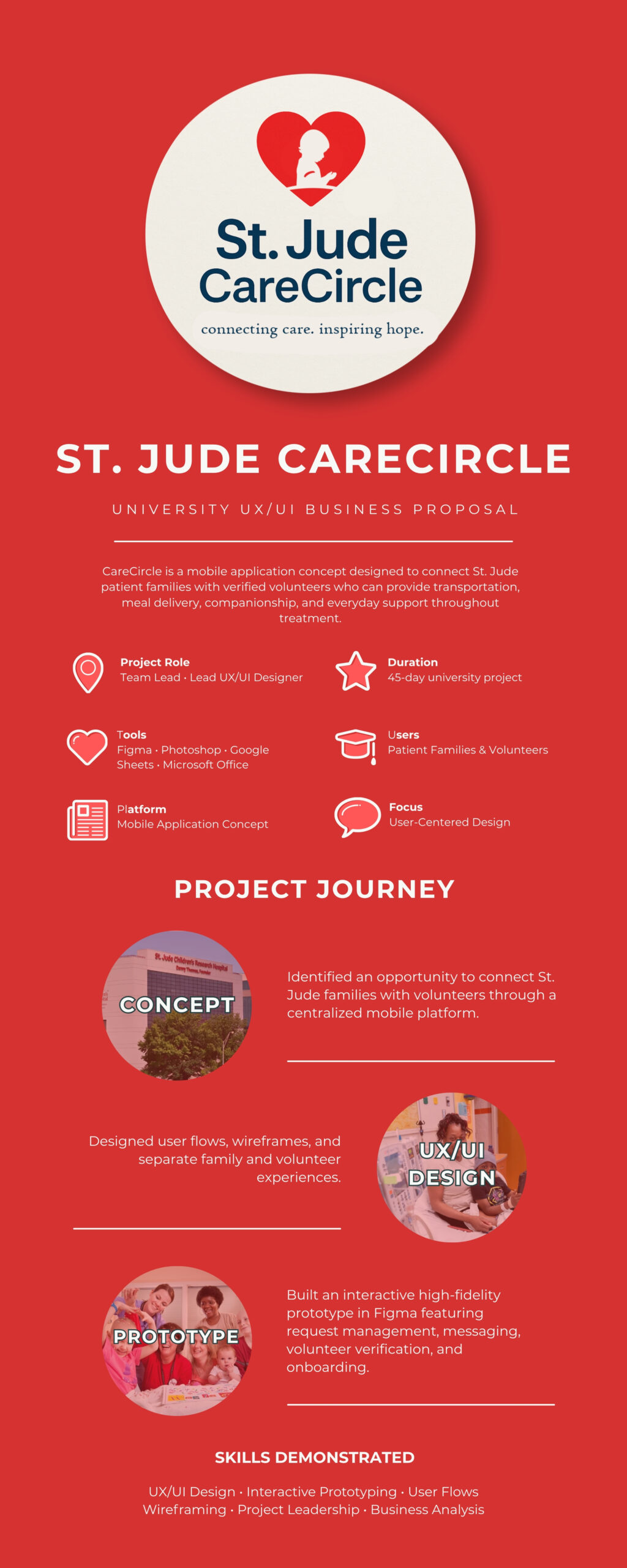
St. Jude CareCircle was developed as part of a Career & Communication Readiness course for business majors. The assignment challenged student teams to propose a new product or service for an existing organization.
Our team selected St. Jude Children’s Research Hospital and developed St. Jude CareCircle, a mobile application concept designed to connect patient families with volunteers who could provide transportation, meal delivery, emotional support, and other forms of assistance throughout a child’s treatment journey.
As the team lead, I directed the project’s overall vision while leading the UX/UI design, creating the interactive prototype in Figma, coordinating project deliverables, and guiding the team from concept through the final presentation.
Project Snapshot
| Project Type | University Business Proposal |
| Role | Team Lead · Lead UX/UI Designer |
| Tools | Figma Photoshop Google Sheets Microsoft Office |
| Duration | 45 days |
| Deliverables | User Research Personas User Flows Wireframes High-Fidelity Prototype Final Presentation |
My Role
As the team lead, I guided the project from concept to final presentation. I established the overall design direction, created the application’s interface in Figma, coordinated project milestones, organized team deliverables, and ensured the final product presented a cohesive user experience. While collaborating with my teammates throughout the project, I completed the majority of the UX design, interface design, documentation, and project organization.
In addition to leading the UX/UI design process, I created a shared Google Sheets project tracker to assign responsibilities, organize deliverables, monitor deadlines, and keep the team aligned throughout the 45-day project.
The Challenge
St. Jude Children’s Research Hospital provides extensive support services for families during a child’s treatment, but I noticed an opportunity to improve how families connect with volunteers for everyday assistance. Before developing the concept, I confirmed that St. Jude did not already offer a dedicated mobile application designed for this purpose.
Growing up in the Memphis area, I was already familiar with St. Jude’s mission through years of community involvement, including participating in the hospital’s Math-a-Thon program. This familiarity, along with my understanding of the hospital’s patient-centered culture, inspired the idea for St. Jude CareCircle.
As part of a Career & Communication Readiness course, our team was challenged to propose a new product or service for an existing organization. We developed CareCircle, a mobile application concept designed to connect patient families with volunteers who could provide transportation, meal delivery, companionship, and other forms of everyday assistance throughout a child’s treatment journey.
The Solution
CareCircle was designed as a centralized mobile application that connects St. Jude families with volunteers through a simple, user-friendly experience. Families can request assistance for transportation, meal delivery, companionship, and other everyday needs, while volunteers can browse opportunities, accept requests, communicate with families, and manage their commitments within a single platform.
Rather than replacing St. Jude’s existing support services, CareCircle was envisioned as a complementary tool that streamlines communication and makes it easier for families to access assistance while providing volunteers with meaningful ways to get involved.
Two Connected Experiences
CareCircle was designed around two distinct user experiences: one for patient families requesting assistance and another for volunteers providing support. While both users share the same platform, each dashboard presents tools and information specific to that person’s role, creating a streamlined experience without unnecessary complexity.
Family Experience
The family dashboard was designed to simplify the process of requesting and managing support during a child’s treatment journey. Rather than requiring families to coordinate assistance through multiple phone calls or organizations, CareCircle provides a single place to request help, connect with volunteers, track active requests, and communicate throughout the process.
Dashboard
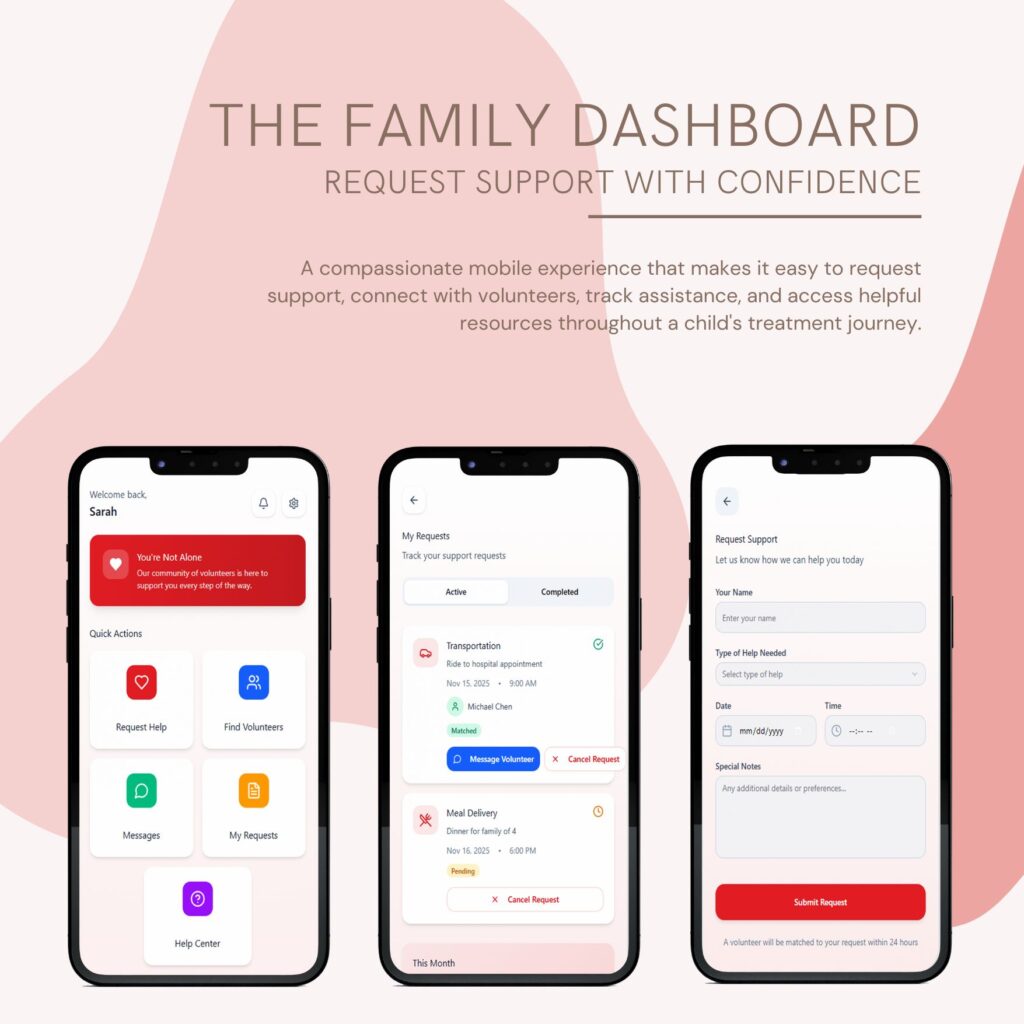
The family dashboard serves as the application’s central navigation hub, giving users immediate access to the features they need most. From the home screen, families can request assistance, browse volunteers, access messages, track active requests, and visit the Help Center. Recent Activity keeps important updates, such as volunteer matches and new messages, visible at a glance.
When a family needs assistance, they can submit a request through a guided form that captures the type of support needed, preferred date and time, and any additional details. The form was intentionally designed to be simple and approachable, reducing unnecessary complexity during what can often be a stressful time.
Submitted requests can then be monitored through the My Requests page, where families can view active and completed requests, check volunteer matches, communicate directly with volunteers, or cancel requests if plans change. Together, these screens create a seamless workflow from requesting help to tracking its progress.

Finding Volunteers
Instead of automatically assigning volunteers, CareCircle allows families to browse available volunteers based on the type of assistance they need. Volunteer profiles display experience, specialties, availability, ratings, and distance, giving families greater transparency before requesting support.
Allowing families to view volunteer information before submitting a request helps build trust while giving them greater confidence in the support they receive.
Messaging
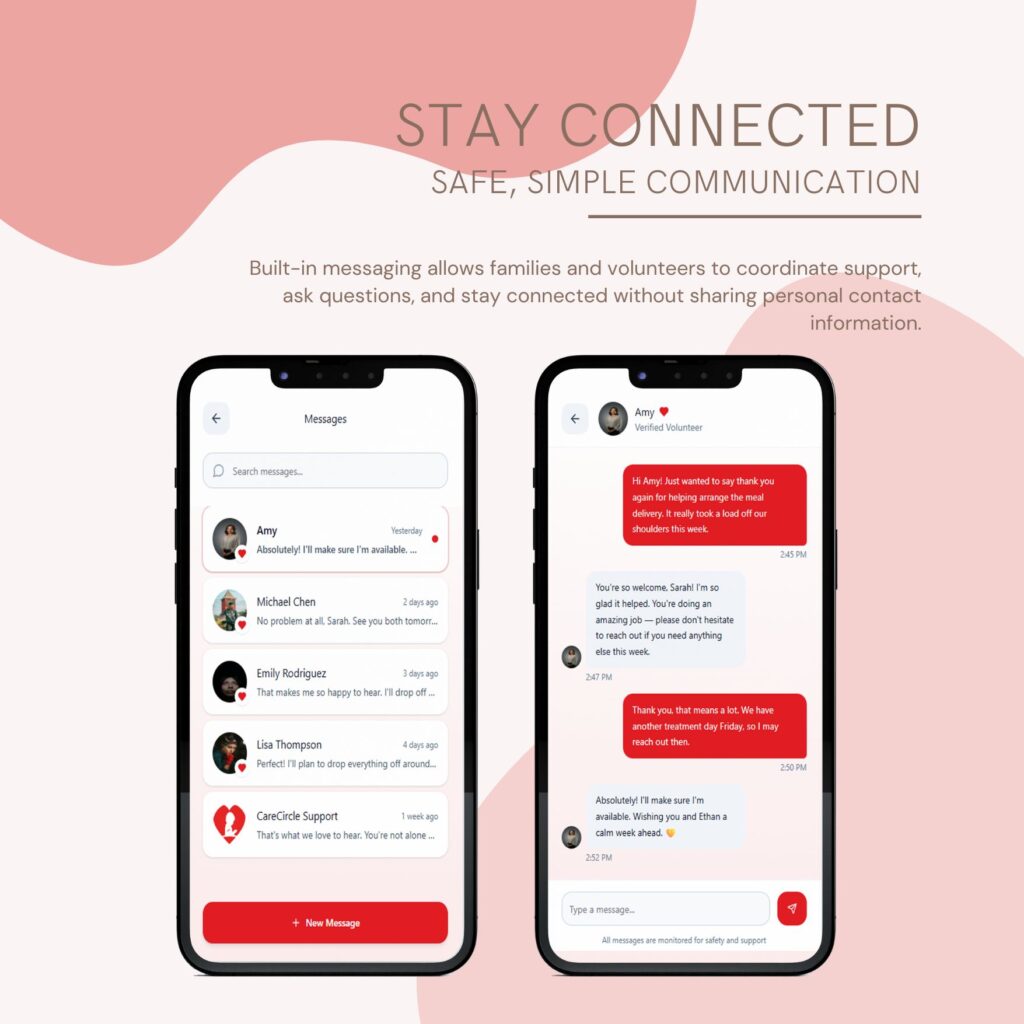
Communication is handled entirely within the application, allowing families and volunteers to stay connected without relying on personal phone numbers or third-party messaging platforms. Conversations remain organized in one place, making it easy to coordinate transportation, meal deliveries, and other volunteer activities while maintaining a consistent communication history.

Help Center
The Help Center provides families with immediate access to answers and support resources without requiring them to leave the application. Searchable FAQs, categorized articles, transportation guides, meal support information, and safety resources help families quickly find the information they need while reducing unnecessary support requests. Direct access to the support team is also available for situations that require additional assistance.
Volunteer Experience
While the family dashboard focuses on requesting and managing support, the volunteer dashboard was designed to help volunteers discover opportunities, communicate with families, manage assignments, and complete onboarding requirements before serving.
Dashboard
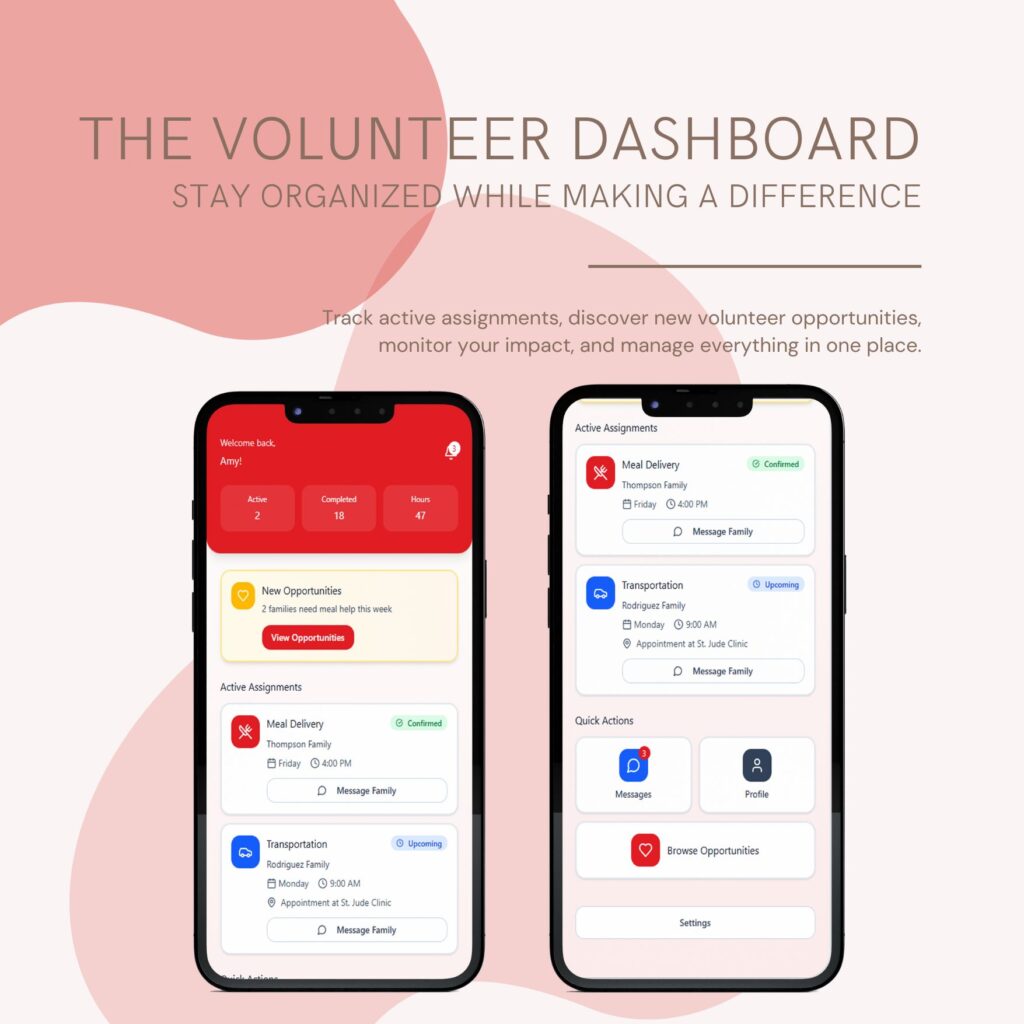
The volunteer dashboard was designed to give volunteers a clear overview of their activity while making it easy to discover new opportunities to help. Upon logging in, volunteers can immediately view active assignments, completed volunteer hours, and newly posted requests from families in need.
The home screen highlights upcoming assignments, allowing volunteers to quickly review important details such as the type of support being provided, appointment times, and locations. A notification card also surfaces new opportunities, encouraging volunteers to continue supporting additional families as their availability allows.
To reduce unnecessary navigation, frequently used actions are available directly from the dashboard. Volunteers can browse available opportunities, access messages, manage their profile, and review current assignments from a single location. This streamlined layout helps volunteers focus less on navigating the application and more on providing meaningful support to families.
By presenting important information at a glance and prioritizing the actions volunteers use most often, the dashboard creates an organized, efficient experience that supports both first-time and returning volunteers.

Browse Opportunities
After completing the onboarding process, volunteers can browse available support requests submitted by families. Opportunities are organized into categories such as meal delivery, transportation, and companionship, allowing volunteers to quickly find assignments that match their interests, availability, and skills.
Each opportunity card provides key details at a glance, including the type of assistance needed, appointment date and time, general location, and a brief description of the family’s request. Priority badges, such as Urgent, help volunteers identify requests that may require immediate attention, while filtering options make it easier to narrow opportunities based on specific needs.
Selecting an opportunity allows volunteers to review additional details before committing to an assignment. This design encourages informed decision-making while giving volunteers the flexibility to choose opportunities that fit their schedule rather than assigning requests automatically.
By allowing volunteers to browse and accept assignments that align with their availability, CareCircle creates a more flexible volunteer experience while increasing the likelihood that families receive timely, reliable support.

Active Assignments
Once a volunteer accepts an opportunity, it moves into the My Assignments section, providing a centralized view of all upcoming commitments. Each assignment card displays the type of support being provided, the family being assisted, scheduled date and time, location, and current assignment status.
The layout was designed to help volunteers quickly review important information before arriving for an assignment. Whether delivering a meal, providing transportation to an appointment, or offering companionship, volunteers can easily reference the details they need without navigating through multiple screens.
Status indicators such as Active and Upcoming help volunteers prioritize their schedule while keeping current and future commitments organized. By presenting assignment information in a clean, card-based layout, the interface reduces cognitive load and allows volunteers to focus on supporting families rather than managing logistics.
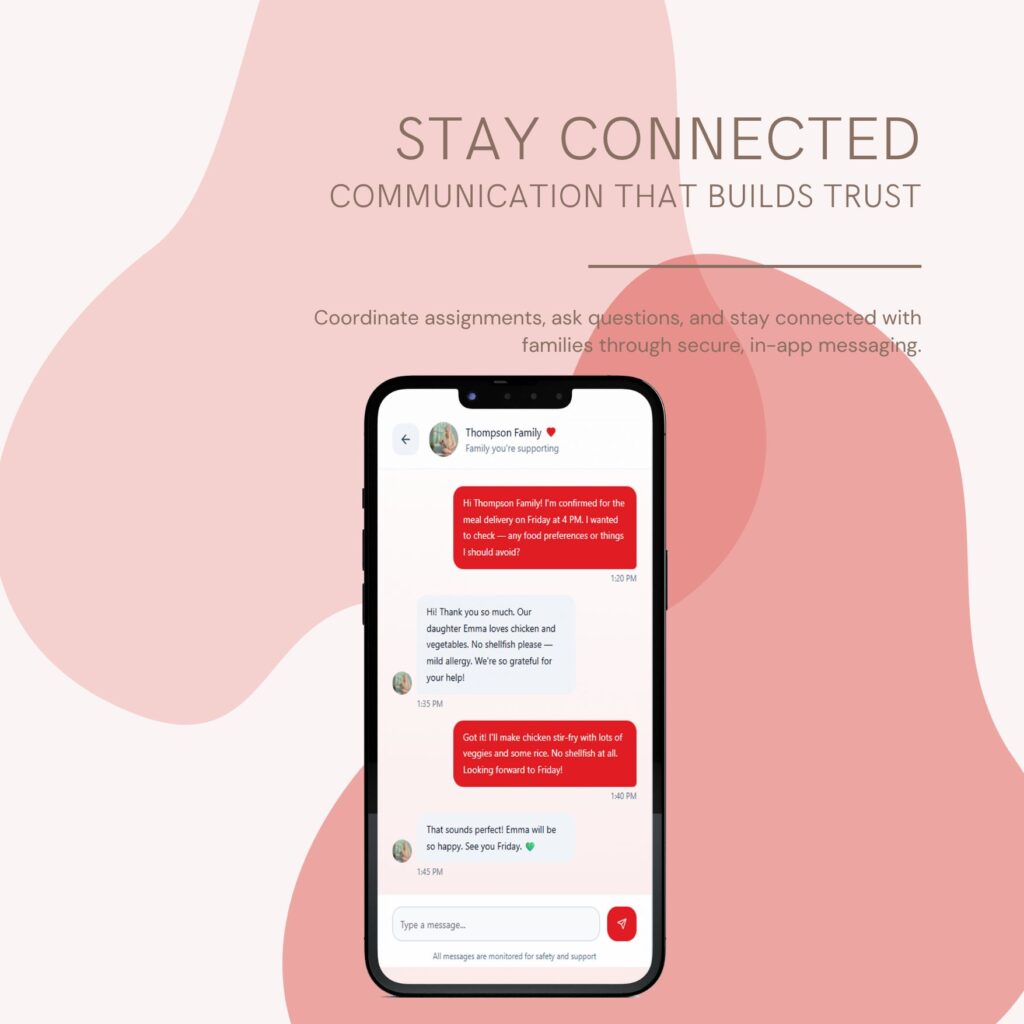
Messaging
Clear communication is essential when coordinating volunteer support. CareCircle’s built-in messaging system allows volunteers and families to communicate directly within the application, eliminating the need to exchange personal phone numbers while keeping all conversations organized in one place.
Volunteers can confirm assignment details, ask questions, provide updates, and coordinate logistics before arriving for a scheduled visit. Whether discussing meal preferences, transportation arrangements, or scheduling changes, the messaging feature helps ensure both volunteers and families have the information they need before the assignment begins.
By integrating communication directly into the volunteer workflow, CareCircle creates a more connected experience while promoting trust, reducing confusion, and helping volunteers provide dependable support throughout each interaction.

Verification & Training
Before volunteers begin assisting families, CareCircle guides them through a structured onboarding process designed to promote safety, trust, and preparedness. Rather than allowing immediate access to volunteer opportunities, the application requires volunteers to complete identity verification, background checks, and training requirements before becoming eligible to serve.
The training experience is presented as a series of progressive learning modules covering topics such as St. Jude’s mission, understanding the needs of patient families, communication best practices, privacy and confidentiality, and volunteer safety guidelines. Modules remain locked until previous lessons are completed, encouraging volunteers to build knowledge step by step rather than skipping important information.
A verification dashboard allows volunteers to monitor their progress throughout the onboarding process. Identity verification, background checks, reference verification, and training completion are clearly displayed, providing transparency while helping volunteers understand exactly what remains before they can begin accepting assignments.
By combining verification with structured training, CareCircle creates a safer experience for both families and volunteers while helping ensure every volunteer is prepared to provide compassionate, informed support from their very first assignment.
Behind the Design
Throughout CareCircle, every screen was created with a specific purpose in mind. From separating the experience for families and volunteers to designing structured onboarding and consistent navigation patterns, each decision was intended to make the application easier to use while building trust between users. Below are several of the key design decisions that shaped the final product.
👥 Separate Experiences for Two User Groups
Rather than designing a single interface for every user, I created independent dashboards for families and volunteers. Each experience prioritizes the tasks, information, and workflows most relevant to that audience, reducing unnecessary complexity.
📋 Consistent Card-Based Design
I used a consistent card layout throughout the application to improve readability and make information easy to scan. Repeating familiar patterns allows users to quickly recognize important actions regardless of where they are in the app.
🛡️ Building Trust Through Verification
Because volunteers would be interacting directly with patient families, I designed an onboarding process that combines identity verification, background checks, and required training before volunteers can begin accepting assignments.
❤️ Supporting People During Stressful Moments
Many families using CareCircle would already be under significant emotional stress. Throughout the interface, I prioritized simple navigation, clear language, and accessible layouts to reduce friction and make common tasks feel approachable.
Project Takeaways
Designing CareCircle strengthened my understanding of user-centered design by challenging me to think beyond individual screens and consider complete user journeys. I learned how design decisions in one part of an application affect the overall experience, particularly when building workflows for multiple user groups.
Serving as the project lead also strengthened my project management and communication skills. In addition to designing the prototype, I coordinated deliverables, established the overall product vision, and guided the project from initial concept through the final presentation.
This project reinforced that successful UX design is not simply about creating attractive interfaces. It’s about understanding user needs and translating complex processes into intuitive, meaningful experiences.
Final Reflection
Although CareCircle began as a university business proposal, it became one of my most comprehensive UX projects. From defining the concept and leading the team to designing interactive prototypes in Figma, the project allowed me to combine business analysis, user-centered design, and problem solving into a single solution.
Looking back, I would continue expanding the platform with features such as volunteer scheduling, administrator tools, and analytics to further support St. Jude families and volunteers. Even as a concept, CareCircle demonstrates how thoughtful technology can strengthen community connections and simplify the coordination of everyday support.