
Project Overview
Managing multiple print-on-demand Etsy shops requires far more than creating product designs. Every new product must be transformed into a complete Etsy listing through a series of repetitive administrative tasks, including entering listing information, generating SEO-focused titles, descriptions, and tags, uploading product images, configuring product options, and saving the listing as a draft for final review.
As my product catalog continued to grow, I recognized that the manual listing process had become a significant bottleneck. Rather than spending valuable time repeating the same workflow for every product, I saw an opportunity to automate the process while maintaining control over final quality assurance and publishing decisions.
To address this challenge, I designed and implemented an automated workflow using n8n that generates complete Etsy draft listings from structured product information. The workflow analyzes uploaded product graphics, generates SEO-optimized listing content using AI, applies conditional business logic, uploads product images, and creates draft listings through the Etsy API. By automating repetitive tasks while preserving human review, the solution significantly reduces listing creation time and provides a scalable process that can support a wide variety of Etsy businesses.
Project Snapshot
| Project Type | Business Process Automation |
| Industry | E-commerce |
| Role | Systems Analyst & Workflow Developer |
| Platform | n8n |
| APIs | Etsy API OpenAI API |
| Data Source | Google Sheets |
| Technologies | JavaScript HTTP Requests JSON |
| Focus Areas | Workflow Automation Systems Integration AI Integration Process Improvement |
The Problem
Creating an Etsy listing involves much more than designing a product. Each listing requires entering product information, writing SEO-focused titles and descriptions, generating relevant tags, selecting categories, configuring listing details, and preparing the listing for publication.
While none of these tasks are particularly difficult, they are highly repetitive. As my product catalog continued to grow, I found myself spending more time creating listings than designing new products or expanding my shops.
My goal was not to remove human involvement from the process. Instead, I wanted to automate the repetitive administrative work while keeping myself in control of the final review. By generating draft listings instead of publishing them automatically, I could quickly verify AI-generated content, make any necessary edits, upload and arrange product images, and confidently publish the finished listing.
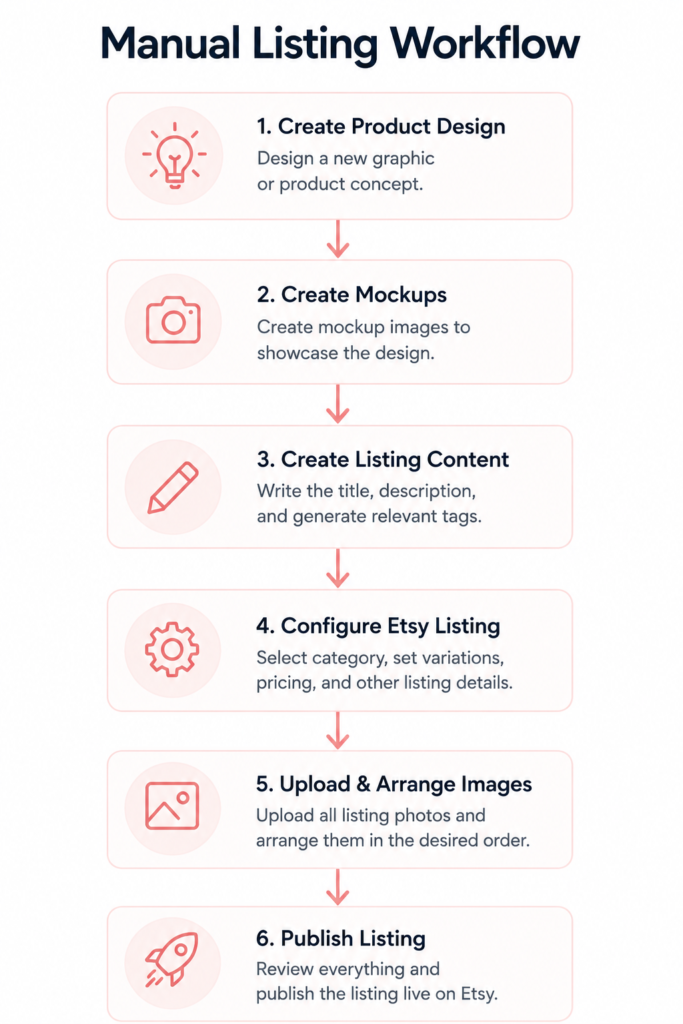
While each step is straightforward, the combined process becomes increasingly time-consuming when repeated across dozens or hundreds of products. I wanted to reduce the time spent on repetitive administrative work without sacrificing the final quality review before publication.
Project Goals
The primary objective of this project was to reduce the time required to create Etsy listings by automating repetitive administrative tasks while maintaining human oversight for quality assurance.
To accomplish this, the workflow was designed to:
- Reduce repetitive manual data entry by automatically generating Etsy draft listings from structured product information.
- Generate SEO-optimized listing content using AI based on the uploaded product design and user-provided inputs.
- Centralize listing configuration using Google Sheets to dynamically retrieve Etsy category IDs, section IDs, shipping profiles, and other product-specific settings.
- Eliminate hardcoded workflow values by separating business rules from the automation logic, making the workflow easier to maintain and scale.
- Support conditional logic for both personalized and non-personalized products.
- Preserve human review by creating draft listings instead of publishing products automatically.
- Create a reusable and scalable solution that can support multiple Etsy shops and product categories with minimal workflow changes.
Solution Design
To reduce the time spent manually creating Etsy listings, I designed a configuration-driven workflow that connects structured form input, AI-generated content, centralized listing data, and the Etsy API.
The process begins when product information and a design graphic are submitted through an n8n form. The workflow analyzes the submission, retrieves the appropriate listing configuration from Google Sheets, generates SEO-focused content using AI, and formats the data for Etsy.
The completed information is then sent through the Etsy API to create a draft listing. The uploaded design graphic is added as a temporary placeholder so the listing can be identified easily within Etsy. I then review the generated content, upload and arrange the final product images, make any necessary edits, and publish the listing manually.
This human-in-the-loop approach automates the most repetitive parts of listing creation while preserving oversight for accuracy, presentation, and final publishing decisions.

Core Design Decisions
Structured input
The form captures the product details needed to begin the workflow in a consistent format.
Configuration-driven logic
Google Sheets acts as a centralized configuration layer containing listing values such as category IDs, shop section IDs, shipping profiles, pricing information, and other product-specific settings.
AI-assisted content generation
AI creates SEO-focused titles, descriptions, and tags based on the submitted product information and design.
Draft-first publishing
Listings are created as drafts rather than published automatically, allowing generated content to be reviewed before it becomes visible to customers.
Human-controlled presentation
Final mockups, image ordering, edits, and publication remain manual because these tasks require visual judgment and quality control.
Building the Workflow
After defining the system requirements and workflow architecture, I implemented the automation in n8n. Rather than relying on a single linear process, the workflow combines AI services, configuration data, conditional logic, and API integrations to automate the creation of Etsy draft listings while preserving human review before publication.
1. Workflow Input
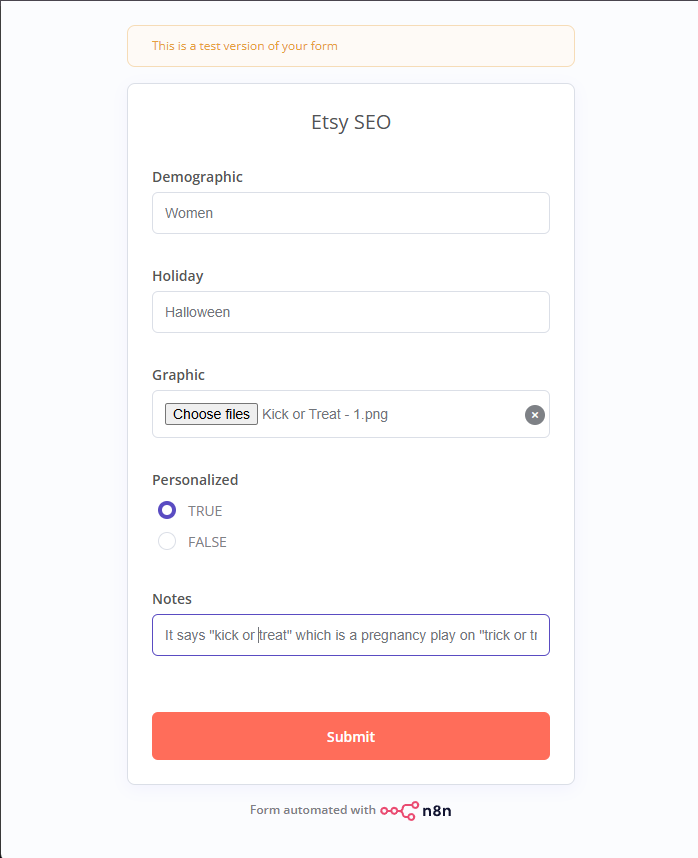
The automation begins with an n8n form that serves as the workflow’s entry point. The form collects the product information required to generate an Etsy listing, including the product graphic, demographic, holiday, personalization settings, and optional notes. The form can be adjusted to accommodate the unique requirements of different Etsy shops and product categories while maintaining the same underlying workflow.
Collecting this information in a structured format ensures that each workflow execution begins with consistent inputs, allowing later stages of the automation to process the data reliably without requiring modifications to the workflow itself.
2. AI-Powered Content Generation
The workflow uses two complementary AI stages to generate Etsy listing content. The first analyzes the uploaded product graphic, while the second combines that analysis with configuration data and user-provided inputs to generate SEO-focused listing content.

Image Analysis
The first AI stage analyzes the uploaded product graphic to identify its visual content, theme, target audience, and other relevant design characteristics. Rather than generating listing content directly, this step produces a structured description that is used by later stages of the workflow.

Context-Aware Content Generation
The second AI stage combines the image analysis with configuration data retrieved from Google Sheets to generate SEO-focused listing content. Product-specific information such as apparel type, available sizes, colors, pricing, personalization settings, and other listing attributes are incorporated into the prompt, allowing the AI to generate titles, descriptions, and tags that align with the product being created. Optional notes submitted through the form can also be included to provide additional context when needed.
3. Configuration-Driven Design
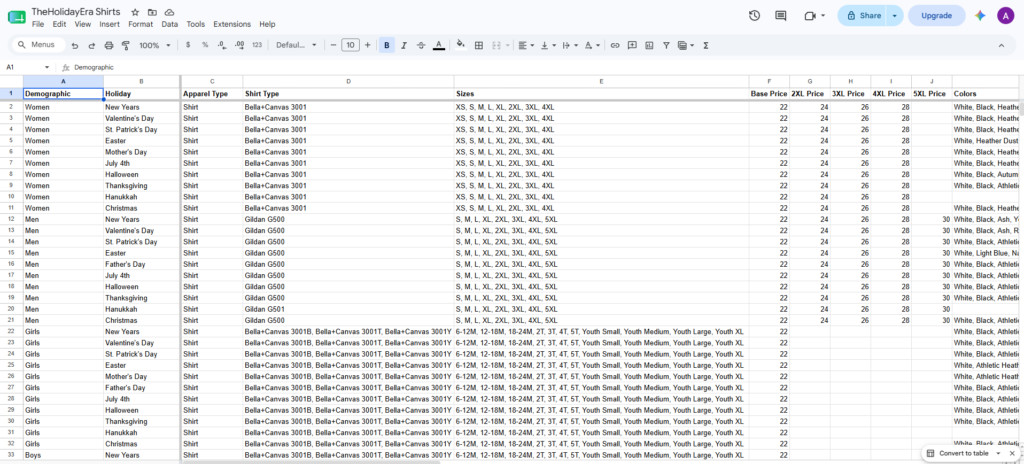

Instead of hardcoding Etsy-specific values throughout the workflow, I created a centralized Google Sheets lookup table containing product and listing configuration data, including category IDs, section IDs, shipping profiles, pricing, available sizes and colors, taxonomy values, and personalization settings.
During each execution, the Google Sheets node uses JSON values from the form submission as filter criteria to retrieve the matching configuration row. The returned data is then combined with the image analysis and passed into later stages of the workflow.
Separating configuration data from the workflow logic makes the automation easier to maintain. Listing values can be updated within Google Sheets without editing the individual n8n nodes or rebuilding the overall workflow
4. AI Response Processing
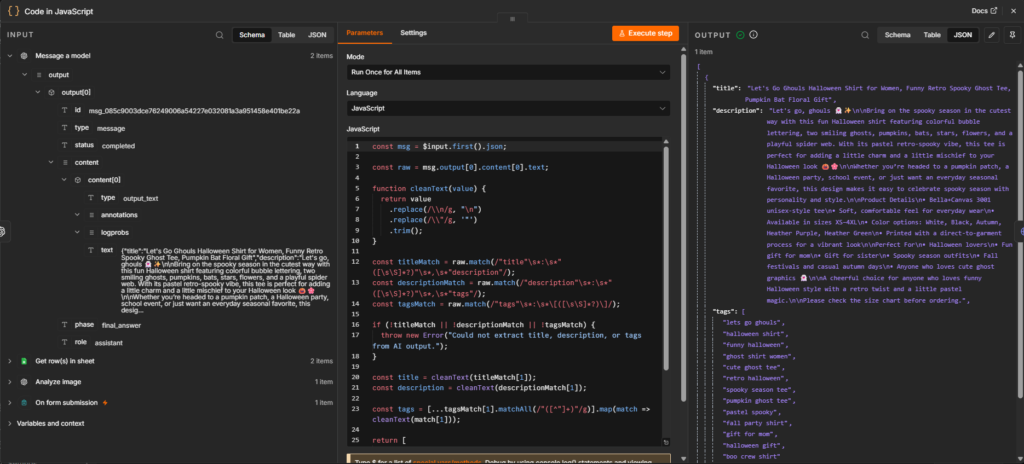
The AI-generated content cannot be sent directly to the Etsy API in its original format. A JavaScript node transforms the model’s response into a structured JSON object by extracting the generated title, description, and tags while cleaning escaped characters and unnecessary formatting. This transformation ensures the data is organized consistently and can be consumed by downstream nodes within the workflow.
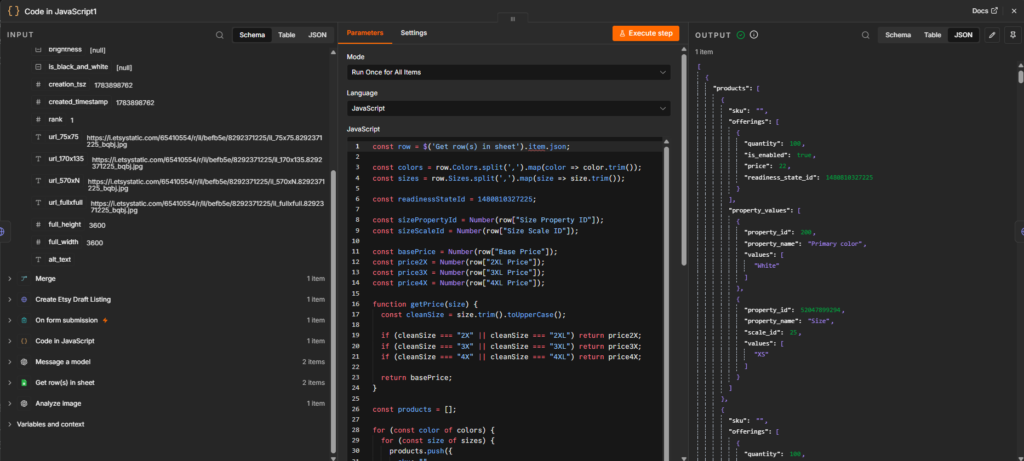
The final JavaScript node transforms the configuration data into the inventory structure required by the Etsy API. Using the values retrieved from Google Sheets, the script dynamically generates product variations, assigns pricing based on size, applies the appropriate property and scale IDs, and constructs the nested JSON payload required to create a complete Etsy listing.
5. Etsy API Integration
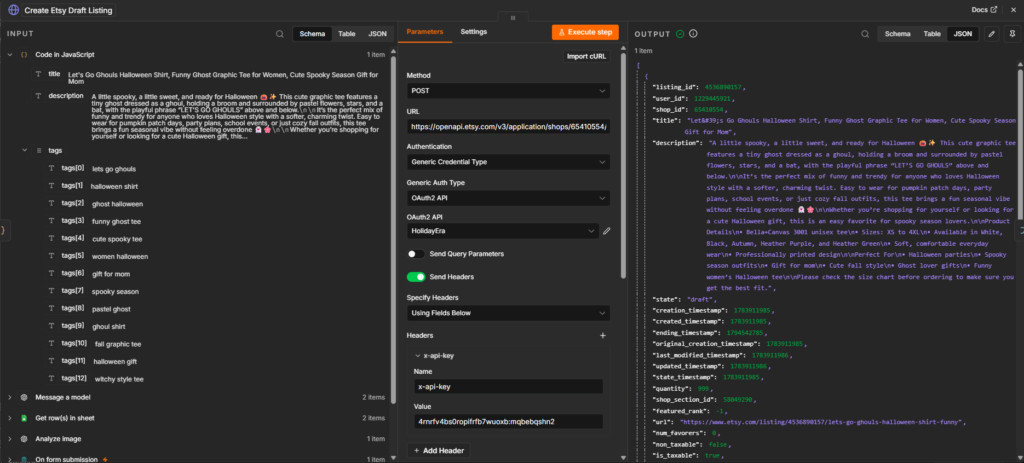
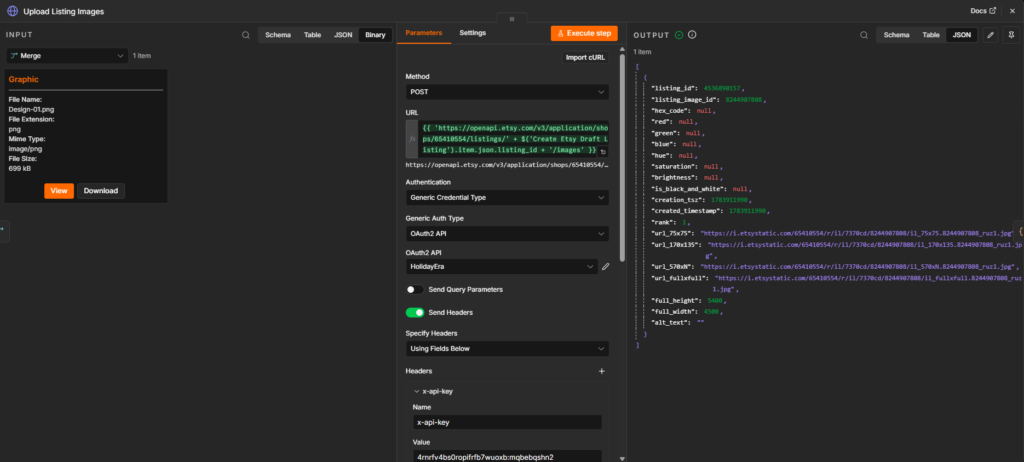

The final stage of the workflow communicates with the Etsy API through a series of HTTP requests. Rather than attempting to create the entire listing in a single request, the workflow performs multiple API operations to construct the completed draft. The initial request creates the draft listing, followed by requests to configure inventory and product variations, and finally upload the product design as a temporary placeholder image. This staged approach aligns with Etsy’s API structure while ensuring each component of the listing is successfully processed before moving to the next step.
After the listing is created, the workflow merges the execution paths before continuing with the remaining API requests.
6. Human Review
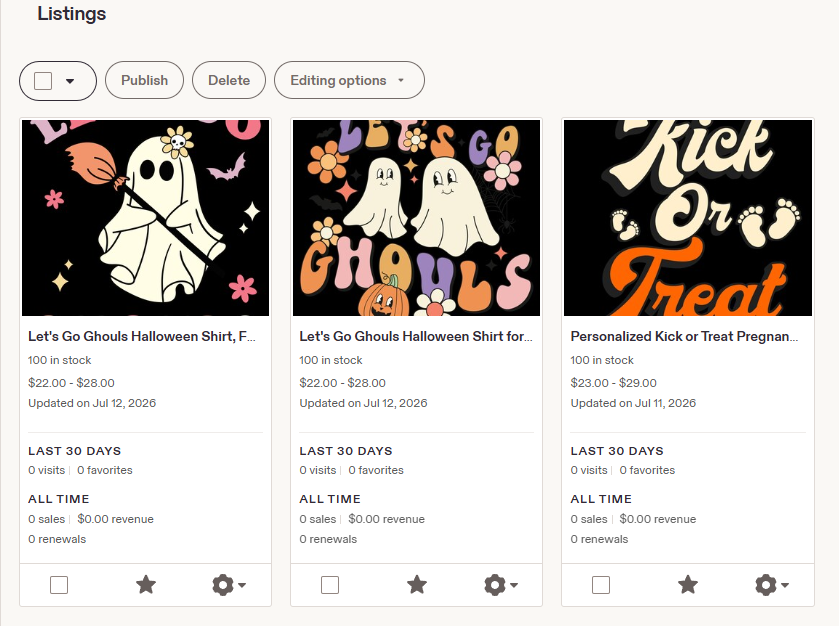

Although the workflow automates the most repetitive aspects of Etsy listing creation, it intentionally concludes by creating a draft listing rather than publishing the product automatically.
This final review stage allows me to verify the AI-generated title, description, and tags, upload and arrange the final product mockups, make any necessary edits, and perform a final quality check before publishing the listing.
Designing the workflow to stop at the draft stage was a deliberate decision. While AI can significantly reduce the time required to create listing content, human oversight remains valuable for evaluating presentation, confirming accuracy, and ensuring each listing meets the desired quality standards before it becomes visible to customers.
This approach reflects AI workflow governance principles by defining clear boundaries for AI-generated content. The workflow automates repetitive tasks while reserving customer-facing decisions, quality assurance, and final publication for human review.
Results
The completed workflow successfully automates many of the most repetitive tasks involved in Etsy listing creation while preserving human oversight for final quality assurance. By combining AI-generated content, configuration-driven data, JavaScript transformations, and Etsy API integrations, the workflow produces complete Etsy draft listings that are ready for final review and publication.
The automation has become part of my production workflow and is used to generate draft listings for my Etsy shops. Rather than manually creating each listing from scratch, I can review the generated content, upload and arrange product mockups, make any necessary adjustments, and publish with significantly less administrative effort.
During the launch of a new Etsy shop, the workflow was used to create more than 130 product listings in approximately one month. By automating repetitive listing tasks, the system allowed me to spend more time designing new products and less time performing repetitive administrative work. While each listing still receives a final human review before publication, the automation significantly streamlined the overall listing process and demonstrated its value in a real-world production environment.
Future Enhancements
Although the workflow is fully functional and currently used in production, there are opportunities to expand its capabilities further.
A key future enhancement would be integrating automated social media publishing into the workflow. After a listing is reviewed and published on Etsy, the workflow could generate and schedule promotional posts for Facebook, Instagram, and Pinterest using the listing title, description, product images, and Etsy URL.
This extension would create a more complete product-launch workflow by reducing the additional manual work required to promote each new listing across multiple platforms. Human review would remain part of the process to ensure that captions, images, and platform-specific formatting are appropriate before publication.
Key Takeaways
Developing this workflow strengthened both my technical skills and my approach to business process automation. Throughout the project, I gained valuable experience designing a maintainable, production-ready workflow while learning how to integrate AI effectively into a real-world business process.
- Designed a configuration-driven workflow by separating business rules from workflow logic using a centralized Google Sheets lookup table.
- Integrated multiple technologies including n8n, OpenAI, Google Sheets, JavaScript, JSON, and the Etsy API into a single automated solution.
- Improved AI-generated content through iterative prompt refinement, testing multiple prompt variations to produce more consistent, SEO-focused listing content.
- Strengthened troubleshooting and debugging skills by interpreting API documentation, validating JSON payloads, and debugging JavaScript throughout the development process.
- Applied AI workflow governance principles by designing the automation to create draft listings rather than publish them automatically, preserving human review for quality assurance and final approval.